Under Desk Storage: Hide Daily Clutter Without a New Desk
Under desk storage is a hanging drawer or caddy, not another tray on the desktop. Measure clearance, then pick a clamp drawer or a screw-on slider.
By Harper Lin
Homeofficebasics is reader-supported. As an Amazon Associate we earn from qualifying purchases. Learn more.
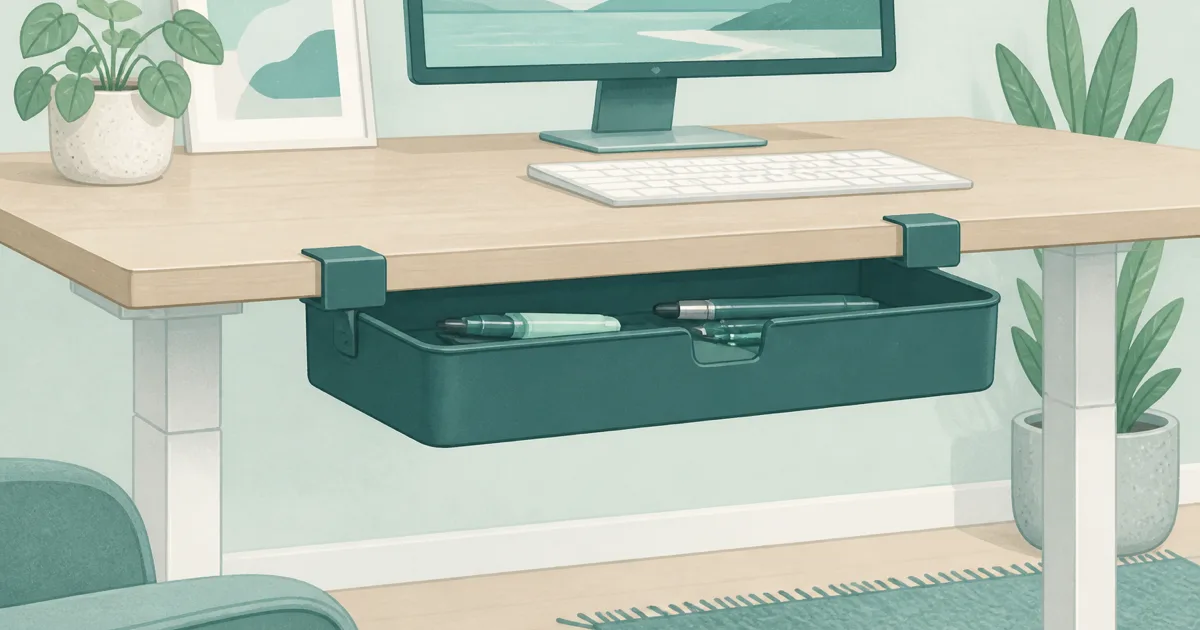
The short answer: Under desk storage is a hanging or sliding drawer under the top, not another caddy on the surface. Use the clamp-on PU leather drawer (paid link) when you cannot drill. Use the Mount-It pull-out drawer (paid link) when the desk is yours and you want a larger bin.
Our picks
A desk organizer keeps pens on the desktop. Under desk storage hides the same stuff so the keyboard zone stays empty when you type or raise a standing desk. The job is simple: get daily clutter off the top without buying a whole new frame.
Measure your underside before you order. Crossbars, drawers, and sit-stand skirts steal the space a clamp needs.
What under desk storage is for
Use it for the objects that wreck a clean desk: pens, sticky notes, USB sticks, a notebook, earbuds, and the charging brick you do not want to look at on camera.
Do not use it as a typing surface. Do not use it as a file cabinet. Hanging files belong in a filing cabinet for home office or a rolling file cabinet when you need casters. Keyboard height belongs on a tray, not in a supply bin you have to open every time you type.
If the desktop is already a stack of trays, clear that first. Under-desk storage works when the top is the work zone and the underside is the stash.
Measure before you pick a mount
Three numbers matter more than the product photo.
- Desk thickness at the front edge. Clamp models list a max thickness. A thick butcher-block top can exceed it.
- Front-to-back clearance under the top. Crossbars, cable trays, and motor housings sit closer to the edge than you think.
- Knee space. Sit down, scoot in, and note where your thighs go. A drawer in that path will annoy you by lunch.
Standing desks add a fourth check: the drawer travels with the top. That is good for access. It is bad if the clamp hits a frame bar at the lowest sit height. Run the desk through sit and stand with a tape measure in the clamp zone.
Setup kit: no-drill clamp, then a real slider
1. Clamp-on PU leather under desk drawer. This is the default for a sit-stand top you do not want to screw into. It hangs from the front edge, holds small daily tools, and can swivel out of the knee path. Keep it for pens, dongles, and a small notebook. It will not swallow a ream of paper. Shop the clamp-on drawer (paid link).
2. Mount-It hidden pull-out drawer. Choose this when the desk is a keeper and you can drive screws into the underside. You get a wider sliding compartment for notebooks, a mouse you are not using, and the extra cables that never fit in a swivel caddy. Confirm the listed height against your knee gap. Shop the Mount-It drawer (paid link).
Most people need one, not both. Renters and standing-desk owners start with the clamp. People with a solid wood or laminate top they own can go straight to the slider.
Clamp vs screw vs adhesive
Adhesive drawers are tempting because they look easy. They fail when the underside is textured, dusty, or warm from a PC. If the listing leans on glue alone and the reviews mention drop-offs, skip it for daily office weight.
A desk shelf is a different add-on. It extends or raises the surface. It does not hide pens under the top.
Standing desks and cable trays
If you already have an under-desk cable basket, do not stack a supply drawer in the same span. Pick one zone for power and one zone for storage. The cable kit in cable management for desk should keep the strip and bricks in the basket. The supply drawer should stay closer to your dominant hand so you are not fishing across the frame.
Leave slack in every cord that rises with the desk. A hanging drawer that pinches a monitor cable will teach you this the first time you stand up.
What to put in the drawer, and what to leave out
In: pens, clips, a small notepad, USB drives, a travel mouse, lip balm, spare earbuds.
Out: (paid link) liquids, a full-size keyboard, hanging files, a power strip (that belongs in a cable tray), anything you need every thirty seconds. If you open the drawer constantly, the item should live on the desk or on a small desk organizer instead.
Load the drawer after it is mounted and you have sat down. If it hits your knees when it is full, it will hit them empty too. Move it sideways before you live with a bad center mount.
When to skip under desk storage
Skip it if a standing desk with drawers is the next purchase anyway. Built-in drawers beat a hanging caddy when you are replacing the whole desk.
Skip it if the real mess is paper. A slim hanging tray will not replace a cabinet.
Skip it if your underside is a maze of bars and you cannot find a six-inch clear patch. In that case, keep a compact organizer on the non-mouse side and protect the typing zone with a desk pad.
Bottom line
Buy under desk storage to clear the desktop, not to add a second messy layer. Start with the clamp-on PU leather drawer (paid link) on a standing desk or rental top. Move to the Mount-It pull-out drawer when you can screw into a desk you own and need a larger bin. Measure thickness, crossbars, and knees first. More setup help lives on the blog and the homepage.
Frequently Asked Questions
What counts as under desk storage?
A drawer, caddy, or tray that hangs or slides under the desktop so the work surface stays clear. It is not a keyboard tray, an on-desk organizer, or a full filing cabinet.
Will a clamp drawer work on a standing desk?
Yes when the front edge is thick enough for the clamp and there is no skirt blocking it. The drawer moves with the top, which is the point.
Do I need to drill holes?
Only for screw-on sliding drawers. Clamp and adhesive models skip holes. On particle-board sit-stand tops, a clamp is usually the safer first try.
How much clearance do I need?
Measure from the underside of the top down to your knees at sitting height, then from the front edge back to the first crossbar. If a frame bar sits close to the edge, a long slider will not fit.
Can I store a keyboard in an under desk drawer?
Do not. A keyboard belongs on a keyboard tray set for typing height. These drawers are for pens, chargers, notebooks, and small tools.
Is this the same as a standing desk with drawers?
No. Built-in drawers come with the desk. Under desk storage is an add-on for a desk you already have. See standing desk with drawers if you are buying a new sit-stand frame.
Will a hanging drawer hit my knees?
It can if you mount it dead center on a shallow desk. Offset it toward your non-mouse side and sit the way you actually work before you tighten the clamp for good.