Cable Management for Desk: A Simple Two-Piece Kit
Desk accessories
Cable management for desk work is two jobs: park the power strip under the top, then wrap the leftover run so it cannot snag when you sit or stand.
Our picks
Most "messy desk" photos are really messy power. Adapters hang, a strip sits on the floor, and every sit-stand move tugs something loose. You do not need a 12-product system. You need the strip off the floor and the remaining cord in one wrap. Sit-stand desks need extra slack so a raise does not yank a port.
If the desk height is still wrong, fix that first with standing desk height. Cables are easier once the top stops moving as a daily experiment.
More tidying tools live in the desk accessories category.
How much cable slack does a standing desk need?
A desk that rises 20 inches needs at least 20 inches of slack, plus a 6-inch service loop, so plan on about 26 inches. Most people leave 24 and wonder why a cord pulls.
Why the number is bigger than you think
Common sit-stand frames travel from about 28 inches seated to 48 inches standing, which is a 20-inch rise. The wall outlet does not move, so every inch of that rise has to come out of the cord. Add a small loop so the cord is not tight at the top of the travel, and the honest number is about 26 inches.
How to test it before you commit
Raise the desk to full standing height and watch the cord that runs to the wall. If it is straight and tight, you need more length. Only then sleeve and secure the run.
The "plan for" column adds a 6-inch service loop so the cord is never tight at the top of the travel. Buy the cord, or the extension, to the plan-for number, not the minimum.
The only layout that survives a standing desk
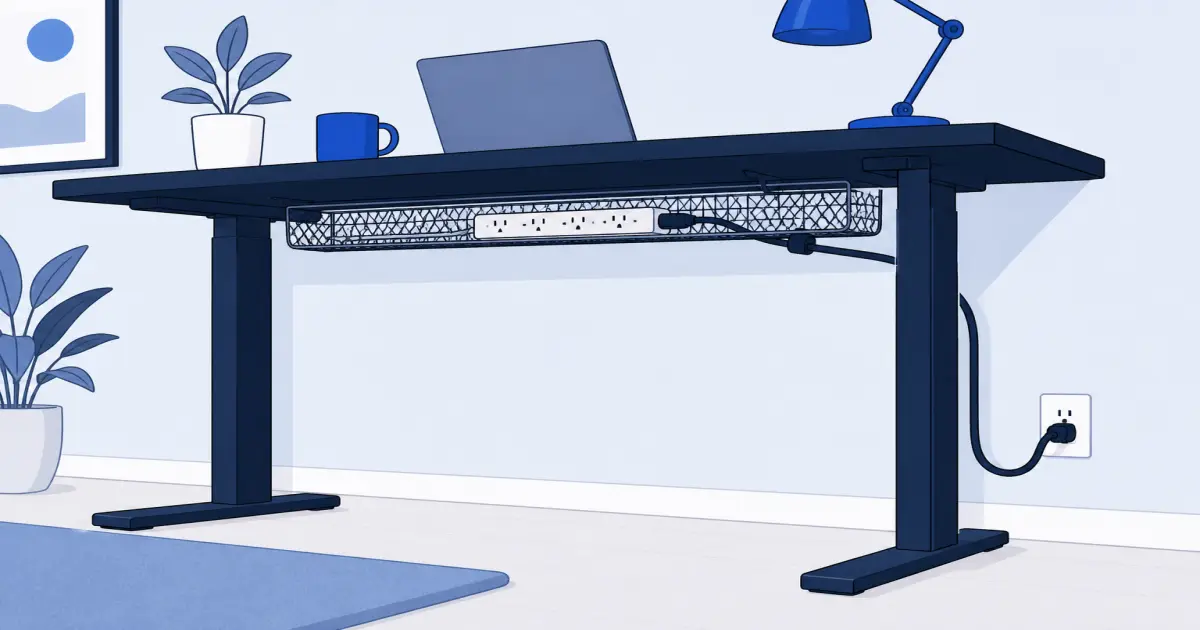
- Mount a tray under the rear of the desktop. The strip and laptop brick live there.
- Plug screens, dock, and lamp into that strip. Short cords stay on the moving surface.
- Leave one long power cord from the strip to the wall, with extra slack for full height.
- Sleeve that run so it looks like one cable, not a handful.
- Test sit and stand before you zip-tie anything permanent.
If a cord still goes from a monitor straight to a wall outlet, it will pull when the desk rises. Move that plug into the tray.
Why do adhesive trays fail on a standing desk?
Adhesive-only plastic trays peel under the repeated load of a desk that moves ten times a day. Heat and movement work the tape loose, and the strip drops. Use a clamp or a screw mount on any desk that rises.
Clamp versus screw versus adhesive
Kit item 1: Litwaro clamp-on tray
The Litwaro Under Desk Cable Management Tray is the tray to start with. Side clamps grab the desk edge, mesh holds a strip plus a few adapters, and you can face the basket in or out. It carries 4.6 stars from 3,382 ratings, with the usual "measure the skirt" notes.
You need a rear overhang the clamp can bite. A thick decorative skirt or a full modesty panel can block it. In that case you need a screw-in tray or a different mount point. Rubber pads on the clamp protect laminate better than bare metal. For scale, a common 6-outlet strip is about 12 inches long, and trays in this class run around 23.6 inches, so there is room for the strip plus a couple of bricks.
Who it is for: Sit-stand desks and renters who will not put holes in a top.
Shop: Litwaro under-desk tray on Amazon
Kit item 2: Alex Tech split sleeve
The Alex Tech 10ft Split Wire Loom Cable Sleeve wraps the leftover cords into one black tube. The split means you can add a cable next month without unthreading the whole run. It carries 4.7 stars from 84,951 ratings, which makes it a boring, safe buy.
Ten feet is enough for most wall runs and a standing-desk loop. Do not sleeve the cords that must stay on the desktop. Sleeve the drop from tray to outlet. If you need the wall itself to disappear, paint a raceway. The sleeve is for the hanging part.
Who it is for: Anyone whose "cable problem" is the bunch between desk and outlet.
Shop: Alex Tech cable sleeve on Amazon
Do you need a grommet, or can you skip it?
You can skip it. A grommet is a nice upgrade that routes surface cables through a hole in the top, but it needs drilling. A tray plus a sleeve solves most of the mess without touching the desk.
When a grommet earns its place
If you have several surface devices and hate the last visible cable segment, a grommet cleans that up. If you rent, or you would rather not drill, route the surface cables over the back edge and straight into the tray instead.
What size power strip fits a tray?
A 6-outlet strip is about 12 inches long and fits a standard tray with room to spare. Check the tray depth too, because a fat brick needs clearance above the basket.
How to check before you buy
Measure your strip, then add an inch for the plug end. Compare that to the tray length. Trays in this class run around 23.6 inches long, 4.5 inches deep, and hold about 11 pounds, which is plenty for a strip and two adapters.
A 20-minute order of operations
Unplug, label with tape if the mess is bad, and lay the strip in the tray before you clamp. Test that every brick fits. Clamp the tray. Plug devices in. Raise the desk to standing height and watch for a taut cord. Only then sleeve the wall run.
A desk organizer will not fix this. Neither will a prettier best desk pad. Those tools handle the top. The tray handles the underside.
What to skip
Skip adhesive-only plastic trays on a standing desk that you raise ten times a day. Skip wrapping every USB cable on the desktop into one fat loom you have to unwrap to plug in a phone. Skip buying five colors of clips before the strip is off the floor.
Bottom line
Do cable management for desk work as a kit. Litwaro holds the strip. Alex Tech wraps the drop to the wall. Leave about 26 inches of slack for a 20-inch rise. If you want a dedicated tray comparison, see best under desk cable tray. If the strip itself should clamp to the desktop edge so outlets rise with you, see under desk power strip. If your laptop still needs HDMI or Ethernet, add a USB hub for desk once power is sorted. That is the whole job.
Frequently Asked Questions
What is the simplest cable management for desk setups?
Put the power strip in an under-desk tray, plug monitors and the PC into that strip, then sleeve the one leftover cord to the wall. The Litwaro tray plus Alex Tech sleeve is that kit.
How much cable slack do I need for a standing desk?
A desk that rises 20 inches needs at least 20 inches of slack plus a 6-inch service loop, so plan on about 26 inches, not the 24 inches most people leave. Test at full standing height before you zip-tie anything.
Do I need to put holes in my desk?
Not with a clamp tray. Confirm the desktop has a rear edge the clamp can grab, and that a crossbar will not block it. Clamp trays in this class fit desktops roughly 0.2 to 2 inches thick. Screw-in trays are stronger on thick tops if you own the desk.
Will a clamp tray fit my desk?
Check two things: desktop thickness and a clear rear overhang. Most clamp trays handle 0.2 to 2 inches of thickness. A thick decorative skirt or a modesty panel can block the clamp even when the thickness is fine.
Why do cheap adhesive trays fail on a standing desk?
Adhesive-only plastic trays peel under the repeated load of a desk that moves ten times a day. Heat and movement work the tape loose. Use a clamp or screw mount on any desk that rises.
How do I handle a standing desk?
Everything that moves should live on the desk: strip, adapters, and short device cords. Only one slack power cord should go to the wall. Leave extra length so nothing yanks at full standing height.
Is a cable box better than a tray?
A floor box hides a strip you never move. A tray is better when the desk rises, because the strip travels with the top. Use a box for a fixed table against a wall.
Will this work with a monitor arm?
Yes. Run display cables down the arm channels, then into the tray. See best monitor arm for the mount, then finish the power bricks here.
What if the cable run is still visible on the wall?
A sleeve handles the hanging part between the desk and the outlet. If the wall itself has to disappear, paint a raceway for that section rather than wrapping more cords.